For most people (including me), budgeting isn’t about becoming a finance expert. It’s about answering a much simpler question:
“Where is my money actually going?”
I built ABC Budget App as a lightweight budgeting tool for people who want clarity without the overwhelm of spreadsheets or complicated finance apps.
This post is a quick tour of what the app does, who it’s for, and what I learned while building it.
Why I built ABC Budget App
I kept noticing the same pattern with friends and myself:
- We tried budgeting in Excel or Google Sheets
- Things got messy or out-of-date
- We stopped tracking — and went back to guessing
At the same time, a lot of personal finance apps feel heavy:
- You have to create an account
- Connect bank accounts
- Agree to long privacy policies
- And then you get a dashboard full of charts you don’t really use
I wanted something in between:
- As simple as a notebook
- As visual as a dashboard
- Private by default
- And easy enough that you’d actually keep using it
That’s how ABC Budget App started.
What the app does
1. Track every income and expense in one place
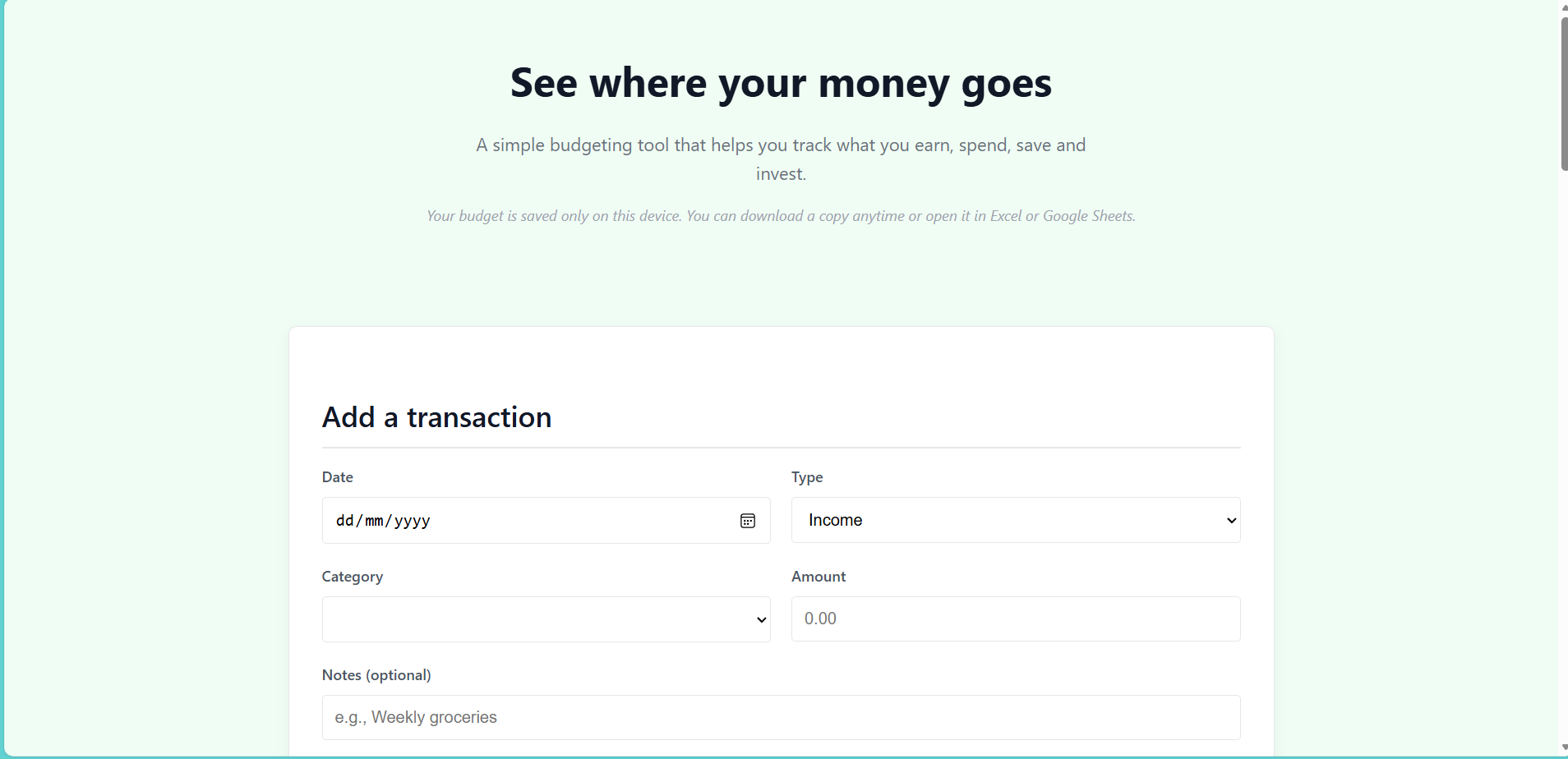
At the top of the app, there’s a simple form to add a transaction:
- Date
- Type: Income or Expense
- Category (you can type your own, like “Rent”, “Groceries”, “Side hustle”, “Savings”)
- Amount
- Optional notes
You can choose your currency (USD, GBP, EUR, NGN, INR or a custom symbol), so the app works no matter where you live.
The idea is simple: every time money comes in or goes out, you add a line. Over time, those small entries become a powerful picture of your financial life.
2. See an overview of your money
Once you’ve added some transactions, the Overview section gives you a quick snapshot:
- Total Income
- Total Spending
- Balance (what’s left)
- Total Saved
- Total Invested
You can change the time period to:
- All time
- This month
- This year
This helps you see, for example, how this month compares to others or how your savings are growing over the year.
3. Understand your budget at a glance
One of my favourite parts of the app is the “Budget at a glance” section.
It shows, for each category:
- The total amount you’ve spent
- What percentage of your income that category takes
So instead of just seeing “I spent £400 on groceries”, you might realise:
“Groceries are 18% of my income, but eating out is 25%.”
That’s usually when people spot the patterns that matter.
4. AI Budget Assistant – gentle insights, not judgment
To make the app more helpful (and a bit smarter), I added an AI Budget Assistant powered by Gemini.
When you click “Ask Gemini”, the app sends your recent transactions (not your name or login, because there is none) and asks for insights such as:
- What am I spending the most on?
- Have my habits changed recently?
- Are there obvious places to cut back?
- How could I adjust my budget to save more?
The goal isn’t to replace a financial advisor — it’s to give you a friendly, data-informed second opinion on your spending habits.
5. You keep control of your data
Privacy and control were important to me while building this.
- Your budget is saved only on your device.
- You don’t need an account or password.
- When you want to move or back up your data, you can:
- Download a copy of everything
- Open it in Excel or Google Sheets as a CSV file
That means you can start simple, and if one day you want more complex analysis, your data is already in a format you can reuse.
Who this app is for
ABC Budget App is for people who:
- Want to start budgeting but feel intimidated by spreadsheets
- Prefer manual tracking to automatically linking bank accounts
- Like the idea of getting AI-powered insights without handing over all their financial life to a big platform
- Are students, early-career professionals, freelancers, or anyone who wants a clearer view of their money without a steep learning curve
If you don’t consider yourself “good with numbers”, this app is designed with you in mind.
What I learned building it
Building ABC Budget App taught me a lot about:
- User experience – People need fewer choices, not more. Clear labels and simple flows beat complex features.
- Data design – A handful of fields (date, type, category, amount) can power meaningful insights when structured well.
- Responsible AI – AI works best in budgeting when it assists rather than judges. Explanations and suggestions matter more than fancy models.
- Privacy by default – You can design tools that are useful without forcing users into accounts and data collection.
What’s next
Some ideas I’m exploring for future versions:
- Simple monthly budget targets per category (“keep Eating Out under 15% of income”)
- A visual chart for spending over time
- Optional “budget templates” for students, freelancers, or families
- More AI prompts like:
- “Help me design a savings plan for the next 6 months.”
- “How could I adjust my spending if I want to invest more?”
If you’d like to try ABC Budget App, you can open it in your browser, start entering a few transactions, and see what your money story looks like over time.
For me, this project isn’t just about tracking numbers — it’s about helping people feel a little more calm, informed, and in control of their financial decisions.